Exploring the Playground: Visualize Your Trust Network
Ever wondered what your trust network actually looks like? The Playground transforms your social connections into an interactive, color-coded graph you can explore in both 2D and 3D.

Leon Acosta
Your Web of Trust is more than just a list of people you follow. It's a living network of connections, trust relationships, and social paths that define who you trust and why. But until now, you could only imagine what it looked like.
Enter the Playground.
See Your Trust Network Come to Life
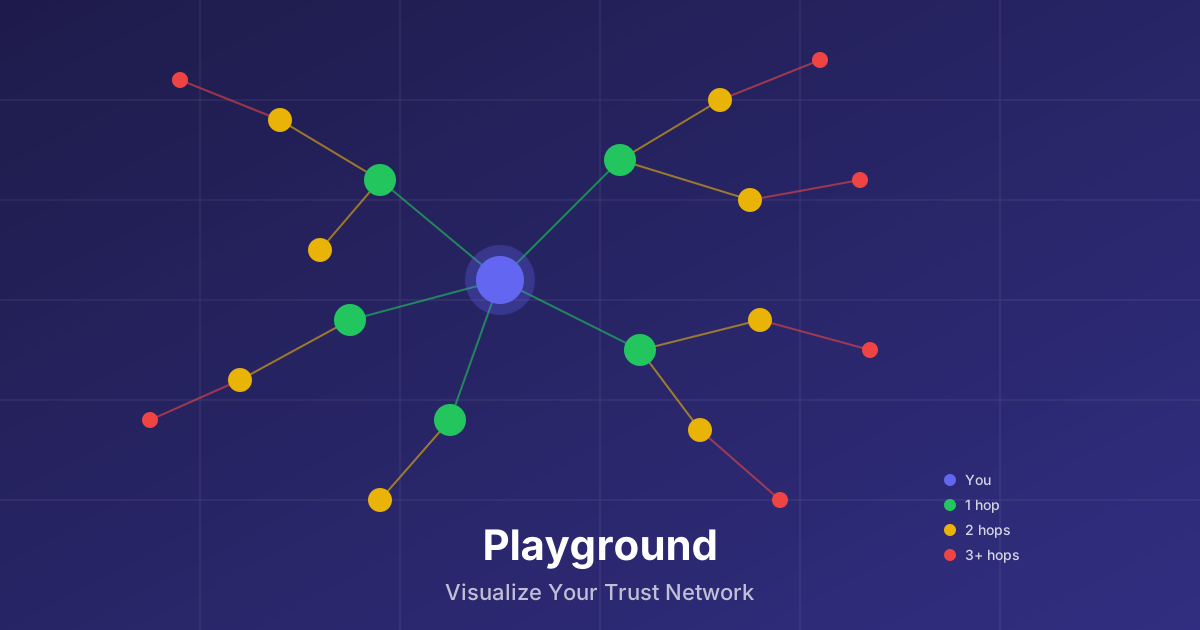
The Playground transforms your abstract social graph into a visual, interactive experience. Every person in your network becomes a node. Every follow relationship becomes a connection. And trust levels? They're painted right on the canvas.
Trust Levels, Color-Coded
At a glance, you can see who you trust most:
- Blue — That's you, the root of your network
- Green — High trust (70%+), usually people you follow directly
- Yellow — Medium trust (30-70%), friends of friends
- Red — Low trust (under 30%), distant connections on the edge of your network
The color system makes it instantly clear where someone stands in your trust hierarchy. No numbers to parse, no lists to scan—just intuitive visual feedback.
Understanding Hops and Paths
The Playground organizes your network by distance—how many hops it takes to reach someone from you.
- 1 hop: People you follow directly (100% distance weight)
- 2 hops: Friends of friends (50% weight)
- 3 hops: Two degrees removed (25% weight)
- 4+ hops: Extended network (10% weight)
But distance isn't everything. The system also considers paths—how many different routes lead to the same person. If you follow someone, and three of your friends also follow them, that's four paths. More paths mean more trust.
When you select a node, you'll see details like "2 hops · 4 paths · 65% trust"—giving you the full context of how that person relates to your network.
Expand and Explore
The real power of the Playground is interactive expansion. You don't see the entire network at once—that would be overwhelming. Instead:
- Start with yourself as the root node
- Click to expand and load your direct follows
- Click any node to expand their connections
- Go deeper, up to 3 hops into the network
This on-demand loading means you can explore exactly the parts of your network that interest you, without waiting for thousands of nodes to load upfront.
Choose Your Dimension: 2D or 3D
Everyone thinks differently. Some prefer a flat, fast overview. Others want to dive into an immersive space. The Playground supports both:
2D Mode
The 2D view renders on a canvas with nodes arranged in concentric circles by hop distance. It's fast, responsive, and can handle up to 10,000 nodes. Perfect for:
- Quick overviews of your network structure
- Finding specific people
- Performance on lower-end devices
3D Mode
The 3D view uses WebGL to render your network in three-dimensional space. Orbit around, zoom in, and explore your network like navigating a galaxy. Great for:
- Immersive exploration
- Understanding complex connection patterns
- Discovering clusters and communities
In 3D mode, use left-drag to rotate, right-drag to pan, and scroll to zoom. Node sizes are based on trust—larger nodes are more trusted.
Filter and Focus
Large networks can get noisy. The Playground gives you tools to filter down to what matters:
- Trust Threshold: Only show nodes above a certain trust percentage
- Distance Limit: Cap the maximum hops displayed (1-5)
- Edge Types: Toggle follows, mutes, or show only mutual connections
- Search: Find specific people by name or pubkey
Combine these filters to answer questions like "Who are my highly-trusted connections within 2 hops?" or "Show me only mutual follows."
Why Visualization Matters
Seeing your trust network isn't just cool—it's useful. You can:
- Spot trusted bridges who connect different parts of your network
- Discover clusters of people who all know each other
- Identify outliers who might be worth following directly
- Understand your reach into different communities
The Web of Trust is a powerful concept, but it becomes truly intuitive when you can see it.
Try It Now
Ready to see your network? Head to the Playground and start exploring. Connect your Nostr account, and watch your trust network unfold before your eyes.
Questions or feedback? Find us on Nostr or check the documentation.