Identity Meets Trust: The Full Picture
We built Web of Trust to help you navigate Nostr. But trust without identity felt incomplete. So we added signing, encryption, multi-account support, and six languages — all in one seamless experience.

Leon Acosta
When we started building the Nostr WoT Extension, the goal was simple: help you see who's in your social circle and who's not. Trust scores, hop distances, visual badges on profiles — the Web of Trust layer.
But as we used it ourselves, something felt off. You had to install a separate extension just to sign into Nostr apps, and that extension had no idea about your trust network. Two tools that should know about each other, living in complete isolation. The experience was fragmented.
So we asked: what if identity and trust lived in the same place?
What We Added
The extension now includes a full NIP-07 identity provider. That means you can use it to sign into any Nostr client, sign events, and encrypt messages — right alongside the trust features you already know.
Here's what's included:
- Sign in everywhere — The extension provides your public key to any Nostr app that asks. One click, you're logged in.
- Sign events — Post notes, react, repost — the extension handles the cryptographic signing. You choose which sites can sign which types of events.
- Encrypted messages — Both the older NIP-04 format and the newer, more secure NIP-44 format are supported for private conversations.
- Granular permissions — You decide what each site can do. Allow notes on one site, block DMs on another. Permissions are remembered so you're not asked every time.
The extension automatically blocks signing requests on insecure HTTP connections, so your keys are never exposed on unencrypted channels.
Your Keys, Always Protected
We take key security seriously. Your private keys are encrypted with AES-256-GCM — the same standard used by banks and governments — protected by your password.
What this means in practice:
- Your keys are always encrypted at rest. Even if someone accessed your browser's storage directly, they'd find only encrypted data — useless without your password.
- Auto-lock keeps you safe when you step away. After 15 minutes of inactivity (configurable), the extension locks itself and wipes key material from memory.
- Keys are never held longer than needed. When the extension signs something, it works with a temporary copy of your key that's destroyed immediately after. The less time sensitive data exists in memory, the better.
Multiple Accounts, Fully Isolated
People use Nostr in different ways. A personal account, a project account, maybe a watch-only account to follow someone's activity. The extension supports all of these:
- Generate a new account — Creates a fresh identity with a recovery phrase you can back up.
- Import an existing key — Bring your nsec and keep using your current identity.
- Watch-only — Add any npub to monitor their trust network without needing their private key.
- Remote signer (NIP-46) — Keep your keys on a separate device and sign remotely through a bunker connection.
Each account is completely isolated. Switching accounts changes everything — your identity, your trust graph, your permissions. There's no accidental cross-contamination between identities.
Web of Trust: See Who You're Talking To
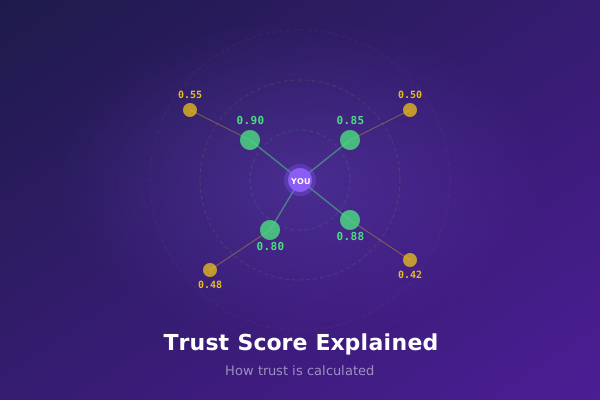
This is the part you already know, and it keeps getting better. The extension builds a map of your social connections and answers one question instantly: how close is this person to you?
- 1 hop — Someone you follow directly. High trust.
- 2 hops — A friend of a friend. Probably trustworthy.
- 3+ hops — Getting distant. Proceed with caution.
- Not connected — Outside your network entirely.
The trust badge engine makes this visible everywhere. When you browse Nostr apps, colored dots appear next to usernames showing their trust level at a glance. No clicking through profiles, no manual checking — just instant context.
All of this works locally in your browser. Your follow graph is synced once and then queried instantly, with no external requests needed for lookups.
Available in 6 Languages
Nostr is global, and the extension should be too. The full interface — onboarding, settings, permissions, prompts, everything — is available in:
- English
- Spanish
- Portuguese
- French
- German
- Italian
The extension detects your browser language automatically. You can also switch manually at any time from the settings menu.
Why It All Belongs Together
The real reason we added identity to the extension isn't technical — it's about experience.
When your signing tool and your trust tool are the same extension, things just work. You don't need to configure two extensions. You don't need to worry about which one has your keys. You sign in, and the trust layer is already there, already running, already showing you who's who.
There's a security benefit too. Because the extension manages both your keys and your trust graph, it can keep them properly isolated from web pages while still making them work together seamlessly for you. Your keys stay encrypted and protected. Your trust data stays local and private. And both are available the moment you need them.
One extension. One setup. Identity, trust, and security working together.
What's Next
The foundation is in place. Here's what we're working on:
- Trust context in signing prompts — When a site asks to sign, you'll see trust information about that site right in the approval dialog.
- More badge support — Expanding the visual trust badges to work with more Nostr clients out of the box.
- SDK improvements — The nostr-wot-sdk lets developers integrate trust into their apps, with the extension detected automatically when available.
The extension is open source and available for Chrome, Brave, Edge, Opera, and Firefox. You can also build from source if you prefer to verify the code yourself.
Questions or feedback? Find us on Nostr or check the documentation.