Nostr Trust Score Explained: How Trust Is Calculated
Trust scores go beyond binary follow checks. Learn exactly how the Web of Trust calculates a 0-to-1 score for any Nostr pubkey based on distance, mutual follows, path count, and bridging bonuses.

Leon Acosta
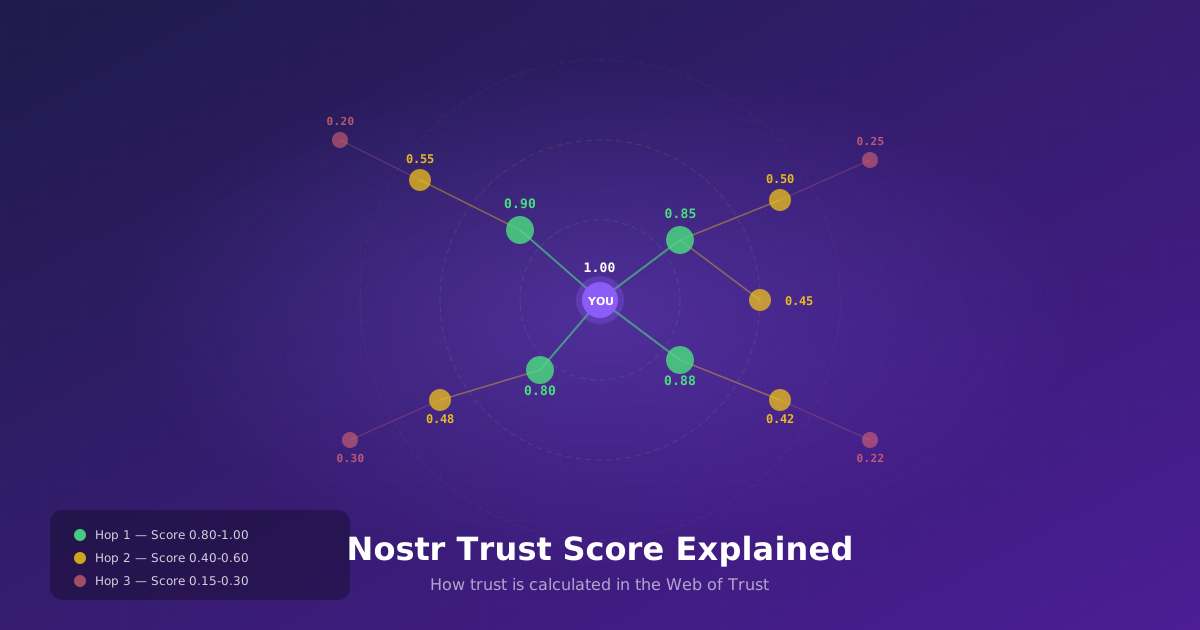
When you use the Nostr Web of Trust extension, every pubkey gets a trust score between 0 and 1. But what does that number actually mean? And how is it calculated?
In this post we'll break down the scoring system, explain each factor, and show you how to use trust scores in your own apps.
What Is a Trust Score?
A trust score is a numeric value from 0 to 1 that represents how closely connected someone is to you through your social graph. It's more nuanced than a simple "follow / don't follow" check.
| Score Range | Meaning | Typical Distance |
|---|---|---|
| 0.80 – 1.00 | Highly trusted | Direct follow (hop 1) |
| 0.40 – 0.60 | Moderately trusted | Friend of a friend (hop 2) |
| 0.15 – 0.30 | Low trust | 3 hops away |
| 0.00 | Unknown / untrusted | Not in your network |
The score isn't just about distance. Multiple factors contribute to the final number.
How Trust Scores Are Calculated
The scoring formula has four components:
score = base(distance) + mutual_bonus + bridging_bonus + path_bonusLet's walk through each one.
1. Base Score (Distance Decay)
The foundation of every trust score is social distance—how many hops separate you from the target pubkey in the follow graph.
// Simplified distance decay
function baseScore(hops) {
  if (hops === 0) return 1.0;   // yourself
  if (hops === 1) return 0.80;  // direct follow
  if (hops === 2) return 0.45;  // friend of friend
  if (hops === 3) return 0.15;  // 3 hops away
  return 0.0;                   // too far
}
The decay is intentionally steep. Each additional hop significantly reduces the base score because trust diminishes quickly through indirect connections.
You can customize the max hops and decay values in the extension settings. Some users prefer a tighter 2-hop network, while others expand to 3 hops.
2. Mutual Follow Bonus
When two accounts follow each other (a mutual follow), the connection is stronger than a one-way follow. The scoring system rewards this:
- A mutual follow at hop 1 adds up to +0.10 to the base score
- Mutual follows along the path also contribute a smaller bonus
This reflects a real-world intuition: if someone follows you back, the relationship is more likely to be genuine.
3. Bridging Bonus
A bridging node is someone who connects otherwise separate parts of your social graph. If multiple independent paths to a pubkey pass through the same intermediate node, that node is a "bridge."
Bridging nodes receive a small bonus because they serve as trust anchors connecting different communities. If you reach someone through a well-connected bridge, it's a stronger signal than reaching them through a single chain.
4. Path Diversity Bonus
The more independent paths that lead from you to a pubkey, the higher the trust score. This is the path diversity bonus.
// More paths = higher confidence
const pathBonus = Math.min(pathCount * 0.03, 0.15);
Think of it this way: if 5 different people you follow also follow someone, that's a much stronger trust signal than if only 1 person connects you.
Trust Score vs. Binary Follow Check
You might wonder: why not just check "is this person in my network, yes or no?" Here's the difference:
| Feature | Binary Check | Trust Score |
|---|---|---|
| Output | true / false | 0.00 – 1.00 |
| Granularity | None | Fine-grained |
| Use case | Simple spam filter | Content ranking, UI badges |
| Mutual follows | Ignored | Counted |
| Path diversity | Ignored | Rewarded |
Binary checks are still useful for quick spam filtering. But trust scores let you build richer experiences—like showing a gradient of trust colors, ranking search results, or setting different permission levels.
Practical Examples
Getting a Trust Score
// Simple trust score check
const score = await window.nostr.wot.getTrustScore(pubkey);

if (score >= 0.7) {
  // Highly trusted - show full content
} else if (score >= 0.3) {
  // Moderate trust - show with indicator
} else {
  // Low/no trust - collapse or flag
}
Getting Detailed Trust Info
// Full trust details with all scoring factors
const details = await window.nostr.wot.getDetails(pubkey);

console.log(details);
// {
//   distance: 2,
//   score: 0.52,
//   paths: 3,
//   mutual: true,
//   bridgingNodes: ["pubkey1...", "pubkey2..."]
// }
Batch Scoring for Feeds
// Score multiple pubkeys at once (efficient)
const pubkeys = events.map(e => e.pubkey);
const scores = {};

for (const pk of pubkeys) {
  scores[pk] = await window.nostr.wot.getTrustScore(pk);
}

// Sort feed by trust score
const rankedEvents = events.sort(
  (a, b) => (scores[b.pubkey] || 0) - (scores[a.pubkey] || 0)
);
How Apps Can Use Trust Scores
Trust scores open up possibilities that binary checks can't:
- Feed ranking: Sort posts by author trust score so trusted content appears first
- Trust badges: Show green/yellow/red indicators next to profile names
- Zap thresholds: Auto-approve small zaps to highly trusted users
- Reply filtering: Collapse low-trust replies while keeping trusted ones visible
- DM filtering: Separate messages from trusted contacts vs. unknown senders
- Permission levels: Grant different capabilities based on trust level
All of these patterns work through the window.nostr.wot API, which is available in any Nostr web app when the extension is installed.
Tuning Your Trust Scores
The extension lets you customize scoring parameters in Settings:
- Max hops: How far to search (2 or 3 hops)
- Decay rate: How steeply trust drops per hop
- Mutual bonus weight: How much to reward mutual follows
- WoT mode: Remote (oracle), Local (browser-only), or Hybrid
Different settings suit different use cases. A marketplace app might want strict 2-hop trust, while a social feed might benefit from a wider 3-hop network with softer decay.
Try It Yourself
The best way to understand trust scores is to experiment:
- Download the extension and set up your account
- Open the Playground and query trust scores for different pubkeys
- Try the API in your browser console:
await window.nostr.wot.getTrustScore("pubkey...")
Watch how scores change as you adjust settings and explore different parts of the Nostr graph.
Questions about trust scoring? Find us on Nostr or check the API docs.